
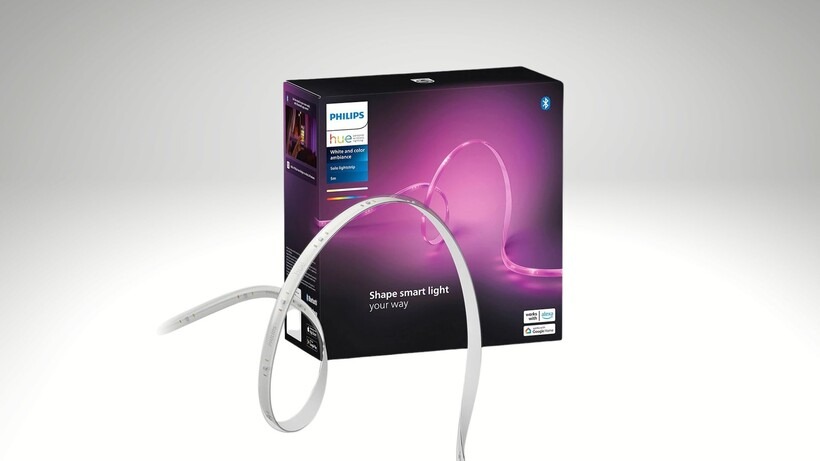
A good TV upgrade does not always need a new screen, a new soundbar, or another black box stacked under the console. The Hue Gradient Lightstrip is getting attention because the price finally feels less painful for U.S. buyers who wanted the premium backlight effect but kept walking away at checkout. For readers tracking smart home product updates, this kind of drop matters because Philips Hue gear rarely sits in the cheap aisle for long. The 55-inch Play model launched in North America in 2020 with a $199.99 U.S. price, while the official Philips Hue store now lists the 55-inch size at $274.99 and says it needs both a Hue Bridge and Hue sync box for TV syncing. That gap is why deal hunters are watching the latest sale chatter so closely. It is not only about saving money. It is about whether this strip finally makes sense for a living room, gaming setup, or small home theater without turning a lighting upgrade into a luxury splurge.
Why the Hue Gradient Lightstrip Price Drop Feels Different
Philips Hue discounts land differently because the brand has trained buyers to expect premium pricing. A basic light strip can be bought for lunch money from half a dozen brands. This product sits in another lane. It is made for people who want the wall behind the TV to react with the screen, not merely glow blue during a movie night.
The launch price set a high bar from day one
When this Play strip arrived in 2020, the price already told buyers it was not a casual add-on. Signify announced three TV sizes for North America, with the 55-inch model at $199.99, the 65-inch at $219.99, and the 75-inch at $239.99. That was before many buyers added the sync box and Bridge, which changed the real cost of ownership.
That is the part many deal posts miss. The strip alone is not the full setup for TV content matching. Philips Hue says the 55-inch model includes the power supply and mounts, but it also says a Hue Bridge and Hue sync box are required for the TV experience. For a buyer in Dallas, Phoenix, or suburban New Jersey, that means the sale price has to be judged against the whole cart, not the strip by itself.
The non-obvious point is that a lower strip price can make the rest of the system feel easier to accept. A sync box still costs real money, but buyers are more willing to build the setup when the biggest visual piece drops below its usual comfort zone. That is how a niche home theater item becomes a wider living-room upgrade.
Why a smart TV light strip costs more than basic LED strips
A cheap LED strip gives you color. This one aims to give you placement, zones, timing, app control, and a cleaner TV fit. A smart TV light strip has to do more than stick to the back of a screen. It has to bend around corners, avoid harsh color jumps, and make the wall feel connected to what you are watching.
That does not mean every buyer needs it. A college apartment with a 43-inch TV and no wall space may be better served by a simpler strip. A family room with a 65-inch OLED, a console, and weekend movie habits is different. There, the light effect can soften the contrast between a bright screen and a dark room.
The price drop matters because it narrows the gap between “nice idea” and “worth trying.” That shift is small on paper but large in real homes. People do not upgrade lighting because a spec sheet wins them over. They do it when the room starts to feel better without demanding a remodel.
What Buyers Should Know Before Grabbing the Deal
A low price can make a smart purchase easier, but it can also hide the parts that still need thought. With this product, the biggest mistake is buying it as if it were a normal strip. It is not. It is part of a system, and the system is where the magic and the cost both live.
The sync box changes the real budget
The Philips Hue Sync Box is the piece that makes the strip react to HDMI video sources. The newer 8K version was recently shown at $308 during Prime Day coverage, down from $385, and Philips Hue’s own U.S. page listed it at $384.99 when checked. That is a serious add-on if you do not already own one.
This creates a plain buying rule. The strip discount is strongest for people who already have Hue gear. If you own a Bridge, use Hue bulbs, and planned to add a TV strip anyway, the math improves fast. If you are starting from zero, you should price the full setup before getting pulled in by the headline number.
A real example helps. Say you have a 65-inch TV in a finished basement, a PlayStation, an Apple TV, and a few Hue bulbs already in the room. The strip becomes part of a room you already use. Now compare that with buying it for a spare bedroom where you watch one show a week. Same sale price. Different value.
Compatibility is where excitement can trip people
The strip is made for specific TV size ranges. Philips Hue lists the 55-inch version for 55- to 60-inch TVs, while the wider product page lists 65-inch and 75-inch models for larger screens with higher official prices. Buying the wrong size is not a small annoyance. It changes how the light sits on the back of the TV and how even the glow looks on the wall.
There is also the HDMI issue. A sync box works with devices plugged into it. That can be perfect for game consoles, streaming boxes, and Blu-ray players. It may not solve everything for people who only use built-in smart TV apps. Before buying, look at how you watch, not only what screen size you own.
The counterintuitive advice is this: the best buyer may not be the person with the biggest TV. It may be the person with the simplest viewing chain. One TV, one streaming box, one console, clean cable routing, and a wall with enough space behind it. That setup will often feel better than a larger room packed with mismatched sources and awkward wiring.
Where the Deal Fits in a U.S. Home Theater Setup
American living rooms are not all built like showroom photos. Many TVs sit on media stands, share space with kids’ toys, face off-center sofas, or hang above fireplaces because the room leaves no better choice. That is why a gradient TV backlight can be more practical than it first sounds. It can make a normal room feel more finished without moving furniture.
The biggest upgrade is comfort, not color
People often think this product is about wild color effects. It can do that, but the better use is softer. A controlled glow behind the screen can reduce the harsh edge between a bright TV and a dark wall. For long games, sports nights, or late movies, that makes the room easier to sit in.
The home theater setup checklist angle is simple: screen, sound, seating, lighting. Most buyers spend on the first two and forget the fourth. Then the room feels flat, even with expensive gear. A well-placed strip adds depth because it changes the space around the screen, not the screen itself.
This is where Philips Hue has an edge over throwaway strips. The colors can connect with other Hue lights in the same room. If you already have side lamps or light bars, the TV wall can become part of a larger scene instead of one glowing rectangle.
Gaming rooms may get more value than movie rooms
A movie gives you a fixed seat and a passive experience. Gaming is more active. Fast color shifts, menus, maps, explosions, and dark scenes all make the backlight feel more noticeable. A gradient TV backlight can make a racing game or open-world title feel wider than the panel itself.
The Philips Hue Sync Box also makes more sense in gaming rooms with external consoles. A PlayStation, Xbox, or Nintendo Switch already uses HDMI, so the setup path is cleaner. The 8K sync box supports higher-end video needs, including 8K at 60Hz and 4K at 120Hz, according to recent deal coverage.
Here is the quiet catch. The effect should support the game, not shout over it. If the brightness is too high, the wall becomes a distraction. Most users get better results by lowering intensity after the first week. The showy demo setting is rarely the setting you keep.
How to Judge the Lowest-Price Claim Without Getting Burned
Deal language can get slippery. “Lowest price” may mean lowest at one retailer, lowest for a certain size, lowest for Prime members, or lowest for a short out-of-stock window. That does not make the deal fake. It means buyers should read the claim like a shopper, not like a fan.
Check size, seller, and condition before you compare
A 55-inch strip at a low price does not prove the 65-inch or 75-inch model is also at a record low. Amazon search results recently showed the 55-inch Play strip at $159.99 against a $274.99 list price, while a price-tracking result showed an out-of-stock Amazon price of $144.99 around Prime Day. Those are useful signals, but they are not the same as a universal price floor across every model.
Seller matters too. A marketplace listing from a third-party seller is not the same as a shipped-and-sold-by major retailer deal. Some buyers are fine with that. Others care about returns, warranty handling, and whether the box arrives new and clean. With Hue gear, saving another few dollars is not always worth a messy return.
A simple filter works: match the exact size, exact model, seller type, and condition. Then compare. Without those four checks, “lowest” can become a noisy word.
The best deal may be a bundle, not the strip alone
Philips Hue’s own store shows bundles with the sync box and larger TV strip, including a 75-inch bundle discount against separate prices. For some buyers, that is cleaner than chasing the strip on one site and the sync box on another. It may not be the rock-bottom number, but it can reduce friction.
That matters more than shoppers admit. A half-built Hue setup sitting in a closet is not a deal. The better buy is the one you install, tune, and use. If a bundle gets the right parts in one order and keeps returns simple, it can beat a lower headline price split across sellers.
Use the smart home lighting deal guide mindset here: total cost, missing parts, install effort, and return path. Price is only one line. The setup has to survive real life after the box arrives.
Conclusion
The latest sale attention around this TV strip makes sense because the product has always lived in that awkward space between desire and hesitation. It looks great in the right room, yet the full setup can scare off buyers who came in expecting a simple LED strip. That is why the Hue Gradient Lightstrip feels more compelling when the strip price drops into a range that leaves room for the Bridge, sync box, or extra Hue lights. The smart move is not to chase the lowest number blindly. Match your TV size, check the seller, confirm what you already own, and think about how you watch. For U.S. buyers who stream through external devices or game on a console, this may be the moment when the premium setup finally earns a place behind the screen. Buy it because the room will feel better, not because the discount feels loud.
Frequently Asked Questions
How much does the Philips Hue TV backlight setup cost?
The final cost depends on what you already own. The strip is only one part. For TV syncing, you may also need a Hue Bridge and a Philips Hue Sync Box, so the full cart can cost much more than the sale price of the strip.
Is the Philips Hue Play strip worth it for a 55-inch TV?
It can be worth it if your TV sits near a wall and you use external HDMI devices. The effect is strongest when the light has space to spread. Small rooms can benefit too, but only if the setup stays clean.
Do I need the Philips Hue Sync Box for TV matching?
Yes, for HDMI-based TV syncing, the Sync Box is part of the setup. The strip can work as a Hue light, but the screen-matching effect needs the right Hue syncing hardware or compatible desktop setup.
What size Philips Hue strip should I buy?
Buy the size that matches your TV range. The 55-inch model is made for 55- to 60-inch TVs, while larger screens need the 65-inch or 75-inch versions. The wrong size can make the glow uneven.
Does the strip work with built-in smart TV apps?
Built-in TV apps can be a problem for HDMI sync setups because they do not pass through the external sync box. Streaming devices such as Apple TV, Roku, Fire TV, or game consoles are usually a cleaner match.
Is a cheaper LED TV strip a better choice?
A cheaper strip is better for simple color lighting. Philips Hue makes more sense if you want screen-aware lighting, Hue app control, and the option to connect other Hue lights in the same room.
Can renters install this without damaging the TV?
Most renters can install it because it attaches to the back of the TV, not the wall. Care still matters. Clean the surface first, place mounts slowly, and avoid rushing the corners where poor alignment shows fastest.
When is the best time to buy Philips Hue lighting?
Major sale windows such as Prime Day, Black Friday, and holiday promotions are usually the best times to watch. Hue products do get discounts, but the strongest deals often move fast or vary by size.