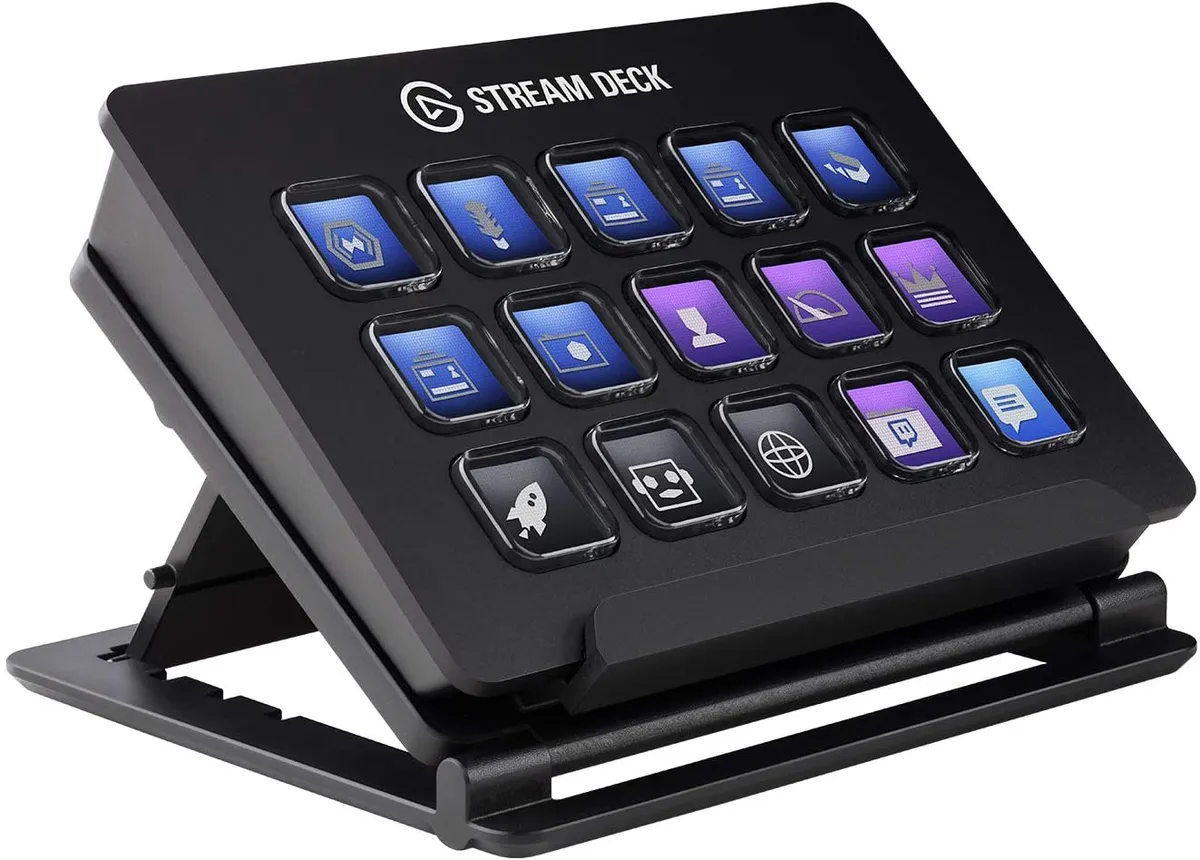
A cluttered creator desk does not fail all at once. It fails in tiny delays: one missed mute, one wrong scene, one extra click while the live chat is moving faster than your hand. That is why Stream Deck MK2 gets attention when the price drops near its tracked lows. It is not magic gear. It is a 15-key control pad that puts repeat actions where your fingers can find them, which matters when your content creator setup is built around speed, focus, and fewer mistakes. Elgato lists the device with 15 customizable LCD keys, USB 2.0, and support for Windows and macOS, so the appeal is plain: you are buying a desk shortcut system, not a toy with lights. For creators watching deals through creator tech coverage, the smarter move is not chasing hype. It is knowing when a discount changes the value math.
Why This Deal Matters Beyond the Price Tag
A low price gets the click, but the better question is what the device removes from your day. Most creators do not need more gear. They need fewer small points of friction. A camera, mic, light, editing app, browser, chat window, and recording software can turn a simple desk into a control room with no clear control panel.
The discount hits a common creator pain point
The strongest case for a sale is not “buy it before it is gone.” That line feels cheap because it skips the real problem. The problem is that creators often build their setup one piece at a time, then spend months fighting the mess they created.
A YouTuber in Ohio might record tutorials at night after work. OBS is open. A browser has notes. A mic app runs in the background. A lamp app controls key lights. The first few recordings feel fine. Then one bad take happens because the wrong window was active when a hotkey was pressed.
That is where a small macro pad starts to feel less like a luxury. The customizable LCD keys give each action a label you can read at a glance. Record. Mute. Marker. Camera. Lights. You stop hunting for the right command and start trusting the desk.
Record lows make “nice to have” gear easier to justify
A tracked low changes how people judge a purchase. Pangoly’s U.S. price-history result has shown a historical low of $109.99 and an average around $148, while older deal coverage also pointed to $109.99 as an all-time-low Prime Day price. That does not mean every store is matching that number today. It means buyers have a real benchmark.
The non-obvious part is this: a discount can make the product easier to judge honestly. At full price, buyers ask, “Do I need this?” Near a low, the sharper question becomes, “Will this save enough time and errors to earn a spot on my desk?”
For a casual gamer, maybe not. For someone posting shorts, podcasts, tutorials, Twitch streams, webinars, or online classes each week, the answer changes fast. That is why a content creator gear checklist matters more than a random cart impulse. The right buy fits the routine you already have.
Where Stream Deck MK2 Fits in a Content Creator Setup
The real value is not the number of buttons. Plenty of cheap pads have buttons. The value comes from making your tools feel less scattered. A good content creator setup should not ask your brain to remember every shortcut while you are also trying to speak clearly, watch framing, track audio, and keep the pace moving.
Live creators get the cleanest win
Live work exposes every weak spot. If you record a video, you can fix a mistake later. If you are live, the mistake becomes part of the show. A wrong scene switch or open mic during a break can throw off the whole room.
The controller’s one-touch setup fits that pressure. Elgato’s own product page describes actions such as launching apps, controlling tools, adjusting audio, playing sound effects, and using plugins, profiles, folders, and multi-actions. That matters for streamers because a streaming workflow is rarely one action at a time.
Think about a small Twitch creator in Texas. A single “Starting Soon” key could switch scenes, mute the mic, start music, and turn on a light preset. A “Break” key could lower audio, change the screen, and keep chat visible. None of that makes the creator better on camera. It makes the desk less likely to betray them.
Offline creators may get more use than streamers
The surprise is that the best buyer may not be a streamer. Editors, podcasters, designers, teachers, and small business owners can get steady value because repeated tasks are everywhere.
A podcast editor might map keys for ripple delete, marker placement, track mute, export settings, and folder access. A real estate agent recording neighborhood videos could set keys for camera toggles, lower-thirds, local file folders, and Zoom controls. A teacher making course videos could run slides, mute audio, start recording, and mark mistakes without touching a mouse.
That is why calling it “streamer gear” sells it short. A streaming workflow is one use case. The larger point is control. If you repeat the same task every day, a labeled key can beat memory, menus, and keyboard gymnastics.
The Features That Make the Drop Feel Worth Watching
A price drop only matters when the product still holds up. Some gadgets age fast because newer models make them feel thin. This one has lasted because it solves a plain problem in a plain way: put the controls you need under your hand, then let the layout change with the work.
The 15-key layout is the sweet spot
The 15-key layout is easy to dismiss until you plan a real page. Six keys can feel tight once you add record, mute, scenes, music, lights, folders, and app shortcuts. Thirty-two keys can feel like a small keyboard you must manage. Fifteen sits in the middle.
Elgato’s technical specs list the unit at 118 x 84 x 25 mm without the stand, with a desktop stand and USB-C cable included. That size matters on American desks that already hold a laptop dock, mic arm, coffee cup, and maybe a second monitor. Gear that needs too much space often gets pushed aside.
Here is the counterintuitive part: fewer visible controls can lead to better control. A huge panel invites clutter. A 15-key grid forces choices. You make a page for recording, a page for editing, a page for calls, and a page for admin work. The limit becomes a design tool.
The software matters more than the hardware
The hardware gets photographed. The software earns the habit. Without profiles, folders, plugins, and multi-actions, the device would be a pretty set of buttons. With them, it becomes a small command center for common work.
Smart profiles are especially useful because layouts can change by app. Your editing keys can appear in Premiere Pro. Your call controls can appear during Zoom. Your streaming page can come forward with OBS. That is where customizable LCD keys beat blank buttons, because the label changes with the job.
A creator in Florida editing wedding reels might use one page for culling clips, one for color work, and one for exports. The same device later controls a client call. No new desk gear. No printed cheat sheet. The buttons tell you what they do.
For deeper buying context, pair this with a streaming setup comparison guide before spending money on extra lights, cameras, or microphones. Controls are not as exciting as image quality, but bad control can make good gear feel clumsy.
How to Decide Before You Buy
A deal can rush people into the wrong purchase. The smarter move is to test your own routine first. Do not ask whether the device is popular. Ask whether your work has repeated commands that interrupt your focus.
Count your daily friction points first
Open your normal creator apps and write down every action you repeat. Start recording. Stop recording. Mute mic. Switch camera. Add marker. Open project folder. Change light color. Trigger intro music. Export file. Post reminder. If the list grows fast, you have a strong case.
Now mark which actions break your rhythm. Not every repeat task deserves a key. The best candidates are actions that happen while you are speaking, recording, editing quickly, or managing more than one app.
This is where a streaming workflow differs from casual computer use. The stakes are higher because attention is split. You are not pressing buttons in a vacuum. You are trying to keep your face, voice, screen, and timing under control while the software waits for no one.
Know when a cheaper option makes more sense
The deal may be good, but the 15-key model is not the only choice. A creator who needs a few call controls might be better served by a smaller unit or even the mobile version. Someone running a more complex studio may want dials, more keys, or a different panel.
The hidden cost is setup time. You must build pages, name actions, choose icons, and clean up what you do not use. That work pays off when your routine is stable. It feels wasteful when you change tools every week.
A practical test helps. For three days, keep a note beside your keyboard. Each time you think, “I wish one button did this,” write it down. If the same five to fifteen actions keep showing up, the device has a job waiting. If your list stays empty, keep your money.
Why Stream Deck MK2 Still Has a Strong Creator Case
A lot of creator gear promises polish from the outside. Better lights make you look cleaner. Better microphones make you sound closer. Better cameras make the frame sharper. This device works in a quieter way. It changes what your hands and attention have to carry.
For U.S. creators building from spare bedrooms, apartment corners, dorm desks, and small offices, that is a serious benefit. The best content creator setup is not the most expensive one. It is the one you can run without losing your place every ten minutes.
The current deal conversation matters because price decides who takes the product seriously. At a normal price, it can feel like a desk upgrade for people who already own everything. Near a record low, it becomes a practical buy for creators who need cleaner control but cannot throw money at every new accessory.
The main thing is to buy it for a routine, not for a fantasy setup. If your day includes recording, streaming, editing, calls, and repeat commands, Stream Deck MK2 can pay you back in calm. Fewer clicks. Fewer mistakes. More attention left for the work people came to see.
Frequently Asked Questions
How much should I pay for an Elgato 15-key controller?
A strong deal is usually near the lowest tracked range, not the normal shelf price. Older deal records have pointed around $109.99 as a standout low. Prices change by retailer, color, bundle, and sale event, so compare before buying.
Is this device worth it for small YouTube channels?
Yes, when your channel has repeat production steps. It helps most with recording controls, audio muting, scene changes, markers, and editing shortcuts. A small channel with a steady upload routine may benefit more than a larger channel with messy habits.
What can I use the customizable LCD keys for?
You can set them for app launches, hotkeys, audio controls, scene switches, folders, smart profiles, sound effects, and multi-step actions. The key benefit is visibility. A labeled button is easier to trust than a shortcut you half-remember.
Does it help with podcast recording?
Yes, especially for solo podcasters who manage recording software while speaking. You can map mute, marker, record, stop, music, notes, and folder shortcuts. It will not fix bad audio, but it can reduce handling mistakes during a session.
Is the 15-key model better than the smaller version?
It depends on your routine. The 15-key model gives more room for scenes, audio, apps, and folders without feeling oversized. A smaller model works better when you only need a few meeting controls or simple shortcuts.
Can it improve a streaming workflow for beginners?
Yes, because beginners often lose time switching between windows and remembering hotkeys. A clear key layout can make live controls less stressful. Start with a small set of actions, then add more once the routine feels natural.
Does it work for non-streaming productivity?
Yes. Many buyers use it for editing, design, calls, spreadsheets, music control, coding shortcuts, and window layouts. The device is useful anywhere repeated commands slow you down or pull your focus away from the main task.
Should I buy it during a sale or wait?
Buy during a sale when the price is close to older lows and your routine already has a clear need for it. Wait if you are buying because of hype, not because you have repeat actions that deserve dedicated buttons.